2. Setting Up Rules
What to do in this step: Check the imported Throw rule, enable it, and use Test Run to confirm the reaction works.
Prerequisites
- The scene with
Throwinstalled in step 1
Steps
-
Click MARS Hub in the left asset list.
-
Expand
Throwunder Execution Rules. The rule looks like this: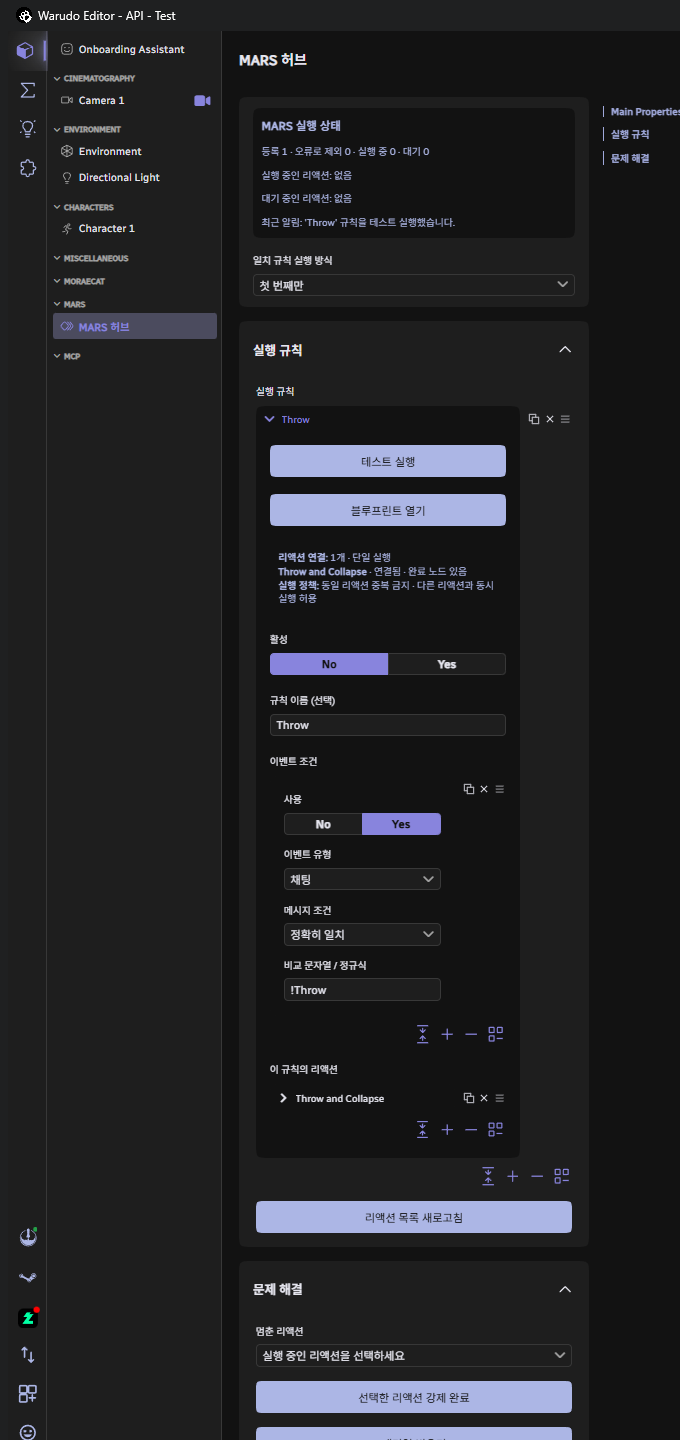
Field Value Meaning Event Type Chat Only checks when the event is a chat message. Message Condition Exact Match The full message must match the string below exactly. Match String / Regex !ThrowOnly !Throwtriggers the reaction.!throwor!Throw pleasewill not.Reactions in This Rule Throw and Collapse The reaction to run when the condition is met. -
Click Test Run at the top of the rule. This skips conditions and runs the reaction directly. If a cat flies out and the character ragdolls, it's working.
-
Set Active to Yes. MARS will now check the condition whenever a real chat event arrives.
-
Save the scene.
Active controls whether the rule is checked automatically when events arrive. It can be off and Test Run still works. Imported rules always come in disabled so you can review them before enabling.
Trying different conditions
- To change the trigger word, edit Match String / Regex to something like
!throw. - To allow multiple commands, switch Message Condition to Regex and enter
^!(Throw|던지기)$. - To trigger on a 1,000 KRW donation, click + under Event Condition to add another condition, set Event Type to Donation, Donation Amount Condition to Exact Match, and Threshold Amount to
1000. When a rule has multiple conditions, any one match fires the reaction.
For more details on conditions, see the Conditions guide.
Verification
- Test Run makes a cat fly out and the character ragdoll.
- The recent notification in MARS Execution Status at the top of the Hub says
Test-ran the 'Throw' rule. - After the reaction finishes, Running returns to
0. If it stays at1, see the FAQ.
Next step: 3. Connecting Platform API Nodes